Learn how to activate SBI net banking online without visiting branch. Step-by-step guide, eligibility, documents, mistakes to avoid, FAQs, charts, and SBI retail net banking setup explained.
How to Activate SBI Net Banking Without Visiting Branch
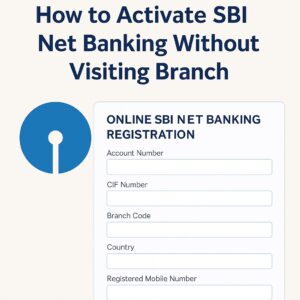
State Bank of India (SBI) is the largest public sector bank in India, and millions of users rely on its digital services every day. With the rise of online banking, customers no longer need to visit a physical branch for essential services like account management, fund transfers, bill payments, UPI activation, or passbook downloads. One of the most useful services is SBI Net Banking, which allows users to manage their bank accounts from anywhere.
The best part? You can activate SBI net banking online without visiting any branch. This guide will walk you through the entire process step-by-step—with screenshots-style visual explanations, tables, eligibility criteria, tips, case studies, and FAQs. This article is crafted for beginners and even those who have never used net banking before. Follow the steps carefully and enjoy complete digital banking freedom.
Quick Overview: Activate SBI Net Banking Online
| Feature | Details |
|---|---|
| Eligible Users | SBI customers with ATM card |
| Branch Visit Required? | No |
| Time Required | 5–10 Minutes |
| Important Requirement | Registered mobile number + ATM card |
Important Links
| Purpose | Link |
|---|---|
| SBI Net Banking Registration | https://retail.onlinesbi.sbi/ |
| SBI YONO App | Download YONO |
| SBI ATM PIN Services | www.onlinesbi.sbi |
Eligibility Criteria
- You must have an SBI savings or current account
- Your mobile number must be linked with your SBI account
- You must have a valid SBI ATM/Debit Card
- Your account must be KYC verified
- You should not have activated net banking earlier
How to Activate SBI Net Banking Online Without Visiting Branch
Step 1: Visit SBI Net Banking Portal
Go to: https://retail.onlinesbi.sbi/
Step 2: Click on “New User Registration”
A pop-up will appear. Select “OK” to continue.
Step 3: Enter Account Details
- Account Number
- CIF Number
- Branch Code
- Country
- Registered Mobile Number
Step 4: Verify OTP
Enter the OTP received on your mobile.
Step 5: Choose “I Have My ATM Card” Option
This allows instant activation without branch visit.
Step 6: Enter ATM Card Details
Enter your SBI ATM card number, expiry date, and CVV (if required).
Step 7: Create Login Username & Password
Choose a strong username and password.
Step 8: Login to SBI Net Banking
Your SBI net banking is now activated instantly.
Common Mistakes to Avoid
| Mistake | Solution |
|---|---|
| Entering wrong account details | Double-check account number & CIF |
| Mobile number not registered | Update mobile number before starting |
| ATM card not active | Generate ATM PIN first |
Tips for Smooth SBI Net Banking Activation
- Ensure your ATM card is working properly
- Keep your registered mobile nearby
- Use a stable internet connection
- Do not refresh the page during registration
- Save your username and password securely
Real-Life Examples & Testimonials
Case Study 1: Student Activates SBI Net Banking in 5 Minutes
Rohit, a college student, activated SBI net banking using his ATM card. He said, “I thought I needed to go to the branch. But it took only 5 minutes online!”
Case Study 2: Working Professional Saves Time
Neha from Bangalore used the online method and avoided wasting hours at a branch. “The steps were super easy,” she shared.
Testimonial: Senior Citizen Benefits
“Because of this guide, I activated net banking without anyone’s help,” said Mrs. Sharma, a retired teacher.
Activate SBI Net Banking Without Visiting Branch (FAQ)
- Can I activate SBI net banking without visiting branch?
Yes, use the “I have my ATM card” option. - Is ATM card necessary?
Yes, if you want to activate instantly. - Can I activate net banking from mobile?
Yes, through browser or YONO. - Is SBI net banking free?
Yes, it is completely free. - Is CIF number required?
Yes, it is a must. - Where can I find my CIF number?
On passbook or SBI YONO app. - What if OTP does not come?
Check network or wait 5 minutes. - Can I use YONO without net banking?
Yes, but with limited features. - How to reset SBI net banking password?
Use “Forgot Login Password” option. - Can NRIs activate net banking online?
Yes, if mobile number is active. - How long does activation take?
Instantly. - Is net banking safe?
Yes, SBI uses advanced encryption. - Can I enable international transactions?
Yes, through net banking. - Can I change mobile number online?
Yes, using ATM + net banking. - Does SBI charge for SMS banking?
Nominal monthly charges apply. - How to activate UPI?
Use YONO or any UPI app. - Can I deactivate net banking?
Yes, through settings. - What if I forget username?
Use “Forgot Username” feature. - Can I register without debit card?
No, branch visit required. - How many accounts can I link?
Multiple SBI accounts can be linked.
Stay Connected
✔ Telegram: Join Channel
✔ WhatsApp: Chat on WhatsApp
✔ Website: FinBankingTech.com
SBI Account Opening Documents List (PDF Included) 2026
Home Loan 2025: Best Banks Interest Rates, EMI Calculator ,Eligibility & Application Guide
Personal Loan: Features, Benefits, Eligibility, Documents, and Best Banks 2025
How AI is Reshaping Retail Banking and Stock-Market Investing
Pingback: What is SBI YONO - Fin Banking Tech