UPI Credit Line on Tap: Learn what the UPI Credit Line on Tap means, how it works, RBI & NPCI guidelines, how to apply, benefits, limits, eligibility, bank-wise process, charges, safety, and 20 FAQs. A complete 2025 guide to using the UPI credit line
UPI Credit Line on Tap: How to Apply and Use
Discover how UPI’s new credit-on-tap feature works, who is eligible, how to apply, and how to use it for everyday payments. This step-by-step guide explains bank-wise limits, interest considerations, security best practices, and 20 FAQs every user should read.

India’s digital payments ecosystem is evolving: the UPI credit line lets eligible users pay using a pre-approved credit limit directly from their UPI app — fast, digital, and convenient. Below is a complete, up-to-date guide to applying and using UPI credit lines responsibly.
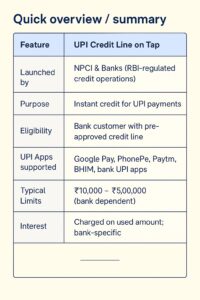
Quick overview / summary
| Feature | UPI Credit Line on Tap |
|---|---|
| Launched by | NPCI & Banks (RBI-regulated credit operations) |
| Purpose | Instant credit for UPI payments |
| Eligibility | Bank customer with pre-approved credit line |
| UPI Apps supported | Google Pay, PhonePe, Paytm, BHIM, bank UPI apps |
| Typical Limits | ₹10,000 – ₹5,00,000 (bank dependent) |
| Interest | Charged on used amount; bank-specific |
Important links
| Service | Link |
|---|---|
| Official website | finbankingtech.com |
| Telegram community | t.me/FinbankingTech |
| WhatsApp support | +91 79054 55959 |
| NPCI (guidelines) | Visit NPCI website for official circulars |
| RBI (regulations) | Visit RBI website for circulars |
Eligibility criteria
Typical requirements to access a UPI credit line:
- Active bank account with complete KYC (Aadhaar & PAN)
- Pre-approved offer from your bank or lender
- Linked mobile number registered with the bank
- Reasonable credit history / bureau score (higher scores for larger limits)
How the UPI credit line works (step-by-step)
1. Bank offers a pre-approved credit limit
Banks or NBFC partners evaluate your profile and may show a pre-approved digital credit offer in their app (or through partner UPI apps).
2. Link the credit line to your UPI app
Open your UPI app and add the approved credit line as a payment source — similar to selecting a bank account.
3. Make payments using the credit source
Choose the “Credit Line” option while paying at QR or merchant checkout. The transaction is debited from your credit line instead of savings.
4. Repay within billing cycle
You’ll get a monthly statement; interest applies only on the amount used. Repay via UPI/bank app to avoid late fees.
Bank-wise availability & sample limits (illustrative)
| Bank / Provider | Sample limit | Sample interest range | Approval type |
|---|---|---|---|
| SBI | ₹25,000 – ₹2,00,000 | 12% – 18% p.a. | Pre-approved offer |
| HDFC Bank | ₹20,000 – ₹1,50,000 | 12% – 20% p.a. | Instant digital |
| ICICI Bank | ₹50,000 – ₹2,00,000 | 11% – 18% p.a. | Pre-approved |
| Axis Bank | ₹25,000 – ₹1,00,000 | 10% – 16% p.a. | Instant |
| IDFC First | ₹20,000 – ₹5,00,000 | 12% – 16% p.a. | Pre-approved |
Note: Numbers are illustrative; check your bank’s offer page for exact limits, interest rates and fees.
Interest rate range (visual)
Low: ~10% p.a.
High: ~24% p.a.
Indicative range across providers: 10% — 24% per annum (check your bank)
UPI credit line vs credit card — quick comparison
| Feature | UPI Credit Line | Credit Card |
|---|---|---|
| Physical card | No | Yes |
| Onboarding speed | Instant / digital | Days |
| Interest | Typically lower (depends) | Usually higher |
| Fees | Often zero processing | Annual fee possible |
| Cash withdrawal | Not supported | Possible (cash advance fees) |
Benefits
- Instant credit for daily payments without a physical card
- Only pay interest on used amount
- Digital onboarding—no paperwork
- Works across all UPI-enabled merchants
Risks & precautions
- Overspending can lead to debt; track usage closely
- Late repayment hurts credit score and triggers fees
- Never share OTP/UPI PIN or bank details with anyone
Charges & fees (what to watch)
Banks may charge:
- Interest on utilised amount (annualised)
- Late payment fees
- GST on interest
- Processing fee (often waived—check offer)
How to apply — step-by-step (short)
- Open your bank’s app and check for “pre-approved offers” / “credit line”.
- Complete any additional KYC (Aadhaar OTP / PAN verification).
- Accept the digital agreement and activate the credit line.
- Open your preferred UPI app and link the credit account as a payment source.
- Select the credit source while paying at a merchant or online checkout.
20 Frequently asked questions (FAQs)
- What is UPI credit line?
A pre-approved digital credit limit linked to your UPI app for payments; interest applies on used amount. - Is UPI credit line similar to a credit card?
Yes in use-case, but no physical card — it’s a digital credit facility. - Does every bank offer UPI credit line?
Not every bank; leading banks and fintech partners offer it in 2024–2025. Check your bank app. - How do I check eligibility?
Open bank app → Pre-approved offers → Check “Credit Line” section. - Is CIBIL score required?
A credit history helps for higher limits; lenders usually check bureau scores for larger offers. - Can I apply without PAN?
PAN is typically required for credit facilities beyond small thresholds. - How much limit can I get?
Varies: ₹10,000 to ₹5,00,000 typically, depending on bank and profile. - What interest rate applies?
Bank-dependent — often in the 10%–24% p.a. range. Verify the exact rate in your offer. - Can I use it on Google Pay / PhonePe / Paytm?
Yes — most major UPI apps support credit line as a selectable payment source. - How is repayment made?
Repay via your bank app or through UPI; you’ll receive a statement/bill for the billing cycle. - Will using the credit line affect credit score?
Yes — timely repayments help, missed payments harm your credit score. - Are there processing fees?
Often no processing fees, but always check the specific offer. - Can I withdraw cash using the credit line?
Generally no — UPI credit lines are for digital payments only, not cash advances. - How quickly is the credit line activated?
Usually instant after digital acceptance and KYC verification. - Is there a minimum usage or tenure?
Terms vary; some offers have a minimum tenure or usage rules — read T&Cs. - Can students or senior citizens apply?
If they receive a pre-approved offer and meet KYC/eligibility, yes. - How do I deactivate a UPI credit line?
Contact your bank via the app or customer care to close or opt out of the facility. - What happens if a payment fails but is debited?
Report immediately to bank/UPI app support; banks/NPCI have dispute resolution processes. - Is it available for international payments?
Primarily India-focused; cross-border availability depends on NPCI and partner banks’ international rollout. - How can I stay safe?
Use trusted apps, don’t share OTP/PIN, enable app lock, and check statements regularly.
Want a WordPress featured image, infographic, or a ready-to-publish HTML file optimized for AMP/SEO? Reply and I’ll generate it.
Loan EMI Calculator: Formula, Tools, and Quick Calculation Tricks (2025 Guide)
How to Apply for a Loan Online: Step-by-Step (2025)
What is Long-Term Investing ? How Compounding Works in Stocks (2025 Guide)
What is Intraday Trading? Meaning Strategies Risks
Gold Loan vs Personal Loan: Which is Better in 2026? Complete Comparison
Pingback: ITR Login Kaise Kare: incometax.gov.in Login Guide (Screenshots) - Fin Banking Tech