Learn how to apply for an SBI ATM card online through YONO and Internet Banking. Check reissue steps, virtual debit cards, charges, delivery, activation and FAQs.
How to Apply for SBI ATM Card Online
Need a new SBI ATM card but do not want to visit a bank branch? In many cases, you can request a debit card online using the official YONO SBI app or SBI Internet Banking. The available options depend on your account, existing card status and the services enabled for you.
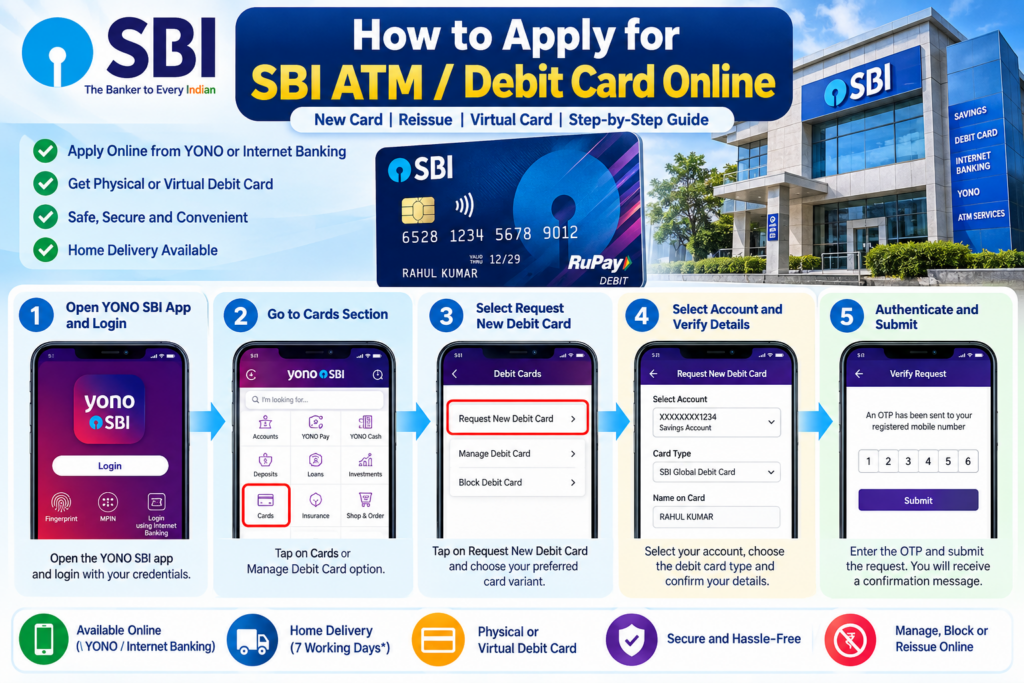
This guide explains how to apply for an SBI ATM card online, request a replacement for a damaged or lost card, understand virtual debit cards, check delivery information and manage card activation. It also explains what to do if you do not have Internet Banking, your registered mobile number is unavailable, or the card request fails.
Whether you searched for how to apply SBI ATM card online, YONO SBI ATM card apply online or SBI debit card reissue online, you will find the relevant steps here. We have kept the instructions simple so that first-time digital banking users can follow them comfortably.
Important: Use only SBI’s official website and genuine SBI applications. Menu names and available services may change, so follow the options displayed in your authenticated banking session.
Quick Overview: SBI ATM Card Online Application
| Particular | Details |
|---|---|
| Bank | State Bank of India (SBI) |
| Online application | YONO SBI and eligible Internet Banking services |
| Card options | Eligible physical debit cards and a virtual debit card option |
| Basic requirements | Eligible SBI account, access to the relevant banking channel and authentication details |
| Registered mobile | Important for OTP-based authentication and service updates |
| Delivery time | SBI’s ATM services FAQ states that a card is generally received within 7 working days after application; confirm the current timeline for your request. |
| Charges | Depend on card variant and applicable SBI charges |
| Official help | SBI website and customer contact centre |
Note: The delivery timeline is a general published service estimate, not a guaranteed date for every application. Check the applicable card charges and terms before submitting your request.
Important Links for SBI Debit Card Services
| Purpose | Link |
|---|---|
| SBI Internet Banking information | Visit SBI Internet Banking page |
| SBI Virtual Debit Card | View official virtual card details |
| SBI ATM services FAQ | Read ATM and debit card FAQs |
| SBI debit card management | Manage ATM card through YONO |
| SBI customer care | Find official contact options |
| FinBankingTech guides | Visit FinBankingTech.com |
What Is an SBI ATM or Debit Card?
An SBI ATM card, commonly called an SBI debit card, allows an eligible account holder to access certain banking services and use available account funds through supported channels. Depending on the card and enabled settings, these services can include cash withdrawals, payments at shops, online purchases and other transactions.
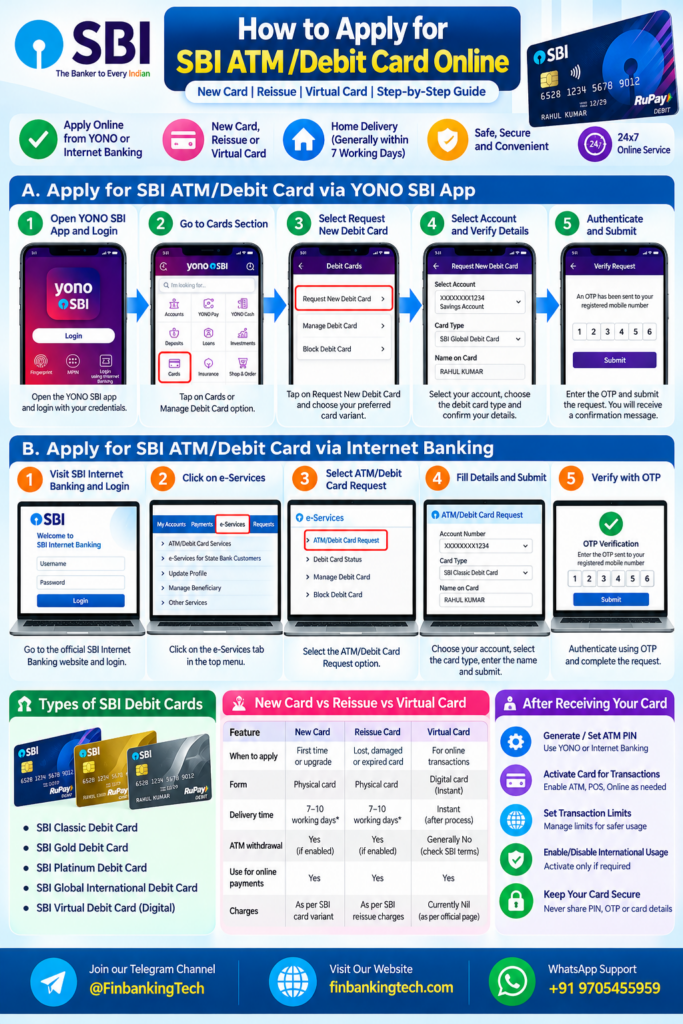
The words ATM card and debit card are often used interchangeably. However, the actual features depend on the card variant, the transaction channel, your account and the settings enabled by the bank.
Physical Debit Card vs Virtual Debit Card
| Feature | Physical card | Virtual card |
|---|---|---|
| Form | A physical card delivered to the recorded address | Digital card generated through the supported banking service |
| Online payments | Subject to card settings and merchant acceptance | Subject to virtual card features and applicable controls |
| Cash withdrawal | At supported ATMs, when enabled | Do not assume ATM withdrawal support; check SBI’s current virtual-card terms |
| Best suited for | Customers who need a card for physical transactions | Eligible customers who primarily need digital card functionality |
Eligibility Criteria for Applying for an SBI ATM Card Online
Before starting, check the following requirements. Availability is subject to SBI’s account and card rules.
- You must hold an eligible SBI account for which the requested debit card service is available.
- Your account should be active and usable for the relevant banking services.
- You should have access to YONO SBI or Internet Banking if you want to use that channel.
- Your registered mobile number should be accessible when the bank requires OTP verification.
- Your account and customer details should be up to date.
- You should be eligible for the requested card variant under the bank’s applicable terms.
- If you are requesting a replacement, you should identify whether the existing card is lost, damaged, expired or otherwise unusable.
Important: Not every account is eligible for every card variant or online request. If the option is unavailable, ask SBI through an official channel rather than trying unrelated links or unofficial agents.
Documents and Details Required
For a standard online debit-card request, you will generally need access to your banking credentials and the account associated with the request. You may not need to upload a separate set of identity documents for every existing-customer card request.
- SBI account details visible in your banking profile.
- YONO SBI login access or Internet Banking credentials, depending on the chosen route.
- Access to the registered mobile number for authentication where required.
- Correct address details recorded with the bank for physical card delivery.
- Details of your existing card, if the request is for replacement or reissue.
If your address, mobile number or customer information is incorrect, resolve the issue through an official SBI channel before placing the request. Do not share your password, ATM PIN, CVV or OTP with anyone claiming to help you apply.
How to Apply for SBI ATM Card Online Through YONO SBI
YONO SBI is a convenient option for eligible customers who want to request a new debit card through their smartphone. SBI’s official guidance describes the following general route: log in to YONO, open the Cards section, select the debit-card service, choose the relevant account and card option, authenticate and submit the request.
Step 1: Open the Official YONO SBI App
Open the genuine YONO SBI application already installed on your phone. If you need to install it, reach the download option through SBI’s official website rather than clicking advertisements or links from unknown messages.
Step 2: Log In Securely
Sign in using the login method supported by your app and account. If you cannot log in, resolve the login issue first instead of repeatedly attempting the card request.
Step 3: Open the Cards Section
Go to the Banking area and look for Cards or Debit Cards. Depending on the version of the app, the exact wording and placement may differ.
Step 4: Select the New Card Request Option
Choose the option for requesting a new debit card. Select the eligible SBI account associated with the request and review the card variants displayed to you.
Step 5: Check the Card and Delivery Details
Review the selected card type and the delivery address displayed in the application. If the address is wrong, do not submit a request until you have checked how to correct the recorded details.
Step 6: Authenticate and Submit
Complete the authentication requested by SBI, such as OTP verification where applicable. Submit the request only after checking the information carefully.
Step 7: Save the Confirmation
Keep the acknowledgement, reference number or confirmation message if one is provided. It may help you follow up if the card does not arrive within the stated period.
Official reference: SBI’s YONO ATM card management guide.
How to Apply for SBI ATM Card Through Internet Banking
If you already use SBI Internet Banking, check whether the ATM/debit-card request service is available in your account.
Step 1: Open SBI Internet Banking
Type the official SBI Internet Banking address into your browser or reach it through SBI’s main website. Check the domain carefully before entering any credentials.
Step 2: Log In to Your Account
Enter your Internet Banking credentials and complete any additional authentication requested by the bank. Never save or share your login details on a public computer.
Step 3: Find the ATM/Debit Card Service
Look in the available service menus for the relevant ATM-card or debit-card request option. SBI may update its menu structure, so the label may differ from older online tutorials.
Step 4: Choose the Relevant Account and Card
If the request option is available, select the account and the card choice offered to you. Read the terms and applicable charges before proceeding.
Step 5: Verify and Submit
Confirm the information shown and complete the bank’s requested verification. Save the confirmation details for future reference.
For current information about the service, visit SBI Internet Banking – Official Website.
Note: The exact new-card request flow may not be identical for every customer. If you cannot find the service, use YONO if eligible or contact SBI directly.
How to Apply for an SBI Debit Card Without Net Banking
Do not have SBI Internet Banking? You may still be able to apply through YONO if you are eligible and can log in to the app. The two services are different access channels, so the absence of Internet Banking does not automatically mean that every online option is unavailable.
If you cannot access either channel, contact your SBI branch or the official customer contact centre. Ask which card-request method is available for your account and whether a branch visit or application form is required.
Do not use an unofficial website or a third-party agent that asks for your OTP, PIN or password to submit a debit-card request.
How to Apply for an SBI Virtual Debit Card
SBI publishes a separate process for eligible customers to request a virtual debit card through YONO. Its official page describes a flow involving YONO, Cards, SBI Debit Card, selecting the savings-bank account, requesting a new card, choosing the virtual card, accepting the terms and submitting an OTP.
- Log in to the official YONO SBI app.
- Open the Cards section and choose SBI Debit Card.
- Select the eligible account shown in the app.
- Choose the new-card request option.
- Select Virtual Debit Card if the option is available.
- Review and accept the applicable terms.
- Submit the request and complete the requested verification.
- Follow the on-screen instructions to activate or use the card.
SBI states on its virtual debit-card page that the card is generated instantly after the required process and that the current issue and annual maintenance charges are nil. Because bank charges and terms can change, verify the latest information on the official page before relying on it.
Read SBI’s official Virtual Debit Card details.
SBI Debit Card Reissue Online: Lost, Damaged or Expired Card
If you already have an SBI debit card but cannot use it, first identify the problem. A card that is lost or stolen requires immediate security action. A damaged card may require replacement, while an expired card may follow the bank’s renewal process.
If Your Card Is Lost or Stolen
- Block the card immediately using an official SBI channel.
- Check recent account transactions and report any unauthorised activity to SBI.
- Use the available YONO or Internet Banking services to check whether a replacement request can be submitted.
- If the reissue option is not available, contact SBI or visit your branch for instructions.
- Keep the complaint or service reference number.
SBI’s official contact-centre page provides a telephone process for blocking an ATM card. Use the bank’s current published instructions rather than relying on a number copied from an unknown website.
If Your Card Is Damaged or Not Working
Check whether the problem is related to physical damage, a blocked card, an incorrect PIN, disabled transaction channels or a temporary ATM issue. If the card itself is damaged, ask SBI whether reissue is available through your account’s online service or whether a branch request is required.
If Your Card Has Expired
Check your registered messages and banking profile for renewal information. If the replacement card has not arrived or you need a new request, contact SBI to confirm the correct process for your account.
Important: Blocking a lost card and requesting a replacement are separate actions. Do not delay blocking a missing card while trying to complete a reissue application.
SBI ATM Card Charges and Delivery Time
The cost of an SBI debit card is not necessarily the same for every customer. SBI publishes card-specific charges, and the applicable amount can depend on the variant and the nature of the request.
| Question | What to know |
|---|---|
| Is a new card always free? | No blanket assumption should be made. Check the charge for your selected card. |
| Is reissue free? | The applicable fee depends on SBI’s current terms and the service requested. |
| How long does physical delivery take? | SBI’s ATM FAQ gives a general estimate of within 7 working days after application. Delays can occur. |
| Can I get a virtual card instantly? | SBI describes instant generation for its eligible virtual debit-card service. |
Before submitting a physical card request, check the current SBI debit card section and its ATM services FAQ. Do not rely on an old blog post for current charges.
SBI ATM Card Activation Online
Receiving a card does not necessarily mean that every transaction channel is enabled. SBI’s published debit-card security guidance says that new, replacement and renewed cards are enabled for domestic ATM cash and point-of-sale transactions by default, while other channels may need to be enabled separately.
To manage your card, use the official YONO app or an eligible SBI Internet Banking service and look for card management or transaction controls. Depending on your card, you may be able to manage:
- ATM transactions.
- Point-of-sale payments at shops.
- Online or e-commerce transactions.
- Domestic and international usage.
- Contactless transactions.
- Transaction limits.
Enable only the transaction channels you need. International usage and online payments should remain disabled when you do not require them, where the available controls allow it.
See SBI’s official card management guidance for the current options.
How to Generate or Set Your SBI ATM PIN
A debit-card PIN is different from your Internet Banking password and your UPI PIN. Use the PIN-generation or reset service provided by SBI for your card.
- Log in to an official SBI channel that supports card management.
- Open the debit-card section and select the relevant card.
- Look for the Set PIN, Reset PIN or equivalent option.
- Complete the verification requested by SBI.
- Follow the on-screen instructions to set or reset the PIN.
If the option is unavailable, check SBI’s current instructions or contact the bank. Never disclose your PIN or OTP to a caller or message sender.
Common SBI Debit Card Application Problems and Solutions
1. The Request New Card Option Is Missing
Possible reasons include account-specific restrictions, an unavailable service, app-version differences or a card already associated with the account. Check the other official channel if appropriate or ask SBI to confirm your eligibility.
2. OTP Is Not Arriving
Check whether your registered mobile number is active, has network coverage and can receive messages. Wait briefly before requesting another OTP. If the number registered with SBI is incorrect or inaccessible, follow the bank’s official mobile-number update procedure.
3. The Application Shows an Error
Check your internet connection, update the official app if needed and retry later. If the problem continues, note the error message and contact SBI. Never send screenshots containing your account number, card details or OTP to public groups.
4. The Card Has Not Arrived
Check the expected delivery period and any available status information. Confirm that your address is correct and ask SBI for the status of the application if the published timeline has passed.
5. The Card Arrived but Transactions Are Declined
Check the card’s activation status, PIN, available balance, transaction limits and enabled channels. If the issue continues, ask SBI whether the card is blocked or whether a bank-side restriction applies.
6. The Card Request Was Debited but No Confirmation Appeared
Do not submit repeated requests immediately. Check the application status or contact SBI with the relevant transaction reference. Follow the bank’s instructions on any charge or failed request.
Safety Tips While Applying for an SBI ATM Card
- Use the official SBI website and official mobile applications.
- Check the website address before entering your username or password.
- Never share your ATM PIN, CVV, Internet Banking password or OTP.
- Do not install screen-sharing applications at the request of an unknown caller.
- Do not pay a third party to obtain a card through a supposedly special link.
- Check your account transactions after reporting a lost or stolen card.
- Enable only the transaction channels you need.
- Save your request reference number and relevant bank communications.
Practical Example: Choosing the Right Card Request
Illustrative example, not a real customer testimonial: Rahul has an SBI savings account and wants a debit card for ATM withdrawals and shop payments. He opens YONO and checks the card variants available for his account. Before submitting the request, he reviews the delivery address and any displayed fee. After submission, he saves the acknowledgement and waits for the card.
Later, Rahul discovers that his card is missing. Instead of immediately submitting another application, he first blocks the lost card through an official SBI channel. He then checks the available replacement procedure. This order of actions helps protect the account while he arranges a replacement.
FAQs About Applying for an SBI ATM Card Online
1. Can I apply for an SBI ATM card online?
Eligible customers can request a debit card through supported SBI digital banking services, including YONO. The exact options depend on the account and card type.
2. How can I apply for an SBI ATM card through YONO?
Log in to YONO, open the Banking or Cards section, select Debit Cards and look for the new-card request option. Select the eligible account, check the details and complete the required authentication.
3. Can I apply for an SBI debit card through Internet Banking?
Check the official Internet Banking service menu for the applicable ATM/debit-card request option. If it is unavailable, contact SBI or check whether YONO offers the relevant service for your account.
4. Can I apply for an SBI ATM card without Net Banking?
You may be able to use YONO if you are eligible and can log in. Otherwise, ask SBI about the available branch-based or alternative application procedure.
5. Can I apply for an SBI debit card through SMS?
Do not assume that an SMS request is supported for every card type or customer. Check SBI’s current official instructions for the particular service before sending any banking request.
6. How do I apply for an SBI debit card reissue online?
Check YONO or Internet Banking for the available replacement or reissue service. If the option is missing, contact SBI. If the card is lost or stolen, block it first.
7. How long does SBI take to deliver an ATM card?
SBI’s published ATM services FAQ gives a general estimate of within seven working days after application. Actual delivery can vary, so use your acknowledgement and official bank updates to follow up.
8. What is the fee for a new SBI ATM card?
The charge depends on the applicable card variant and current SBI schedule. Check the official debit-card charges before submitting the request.
9. Is an SBI virtual debit card available online?
SBI offers a virtual debit-card service to eligible customers through YONO. Review the official product page for the current features, conditions and charges.
10. Can I use an SBI virtual debit card at an ATM?
Do not assume that a virtual card supports physical ATM withdrawals. Check the current terms of SBI’s virtual debit-card product for supported uses.
11. How can I activate a new SBI debit card?
Follow the activation and PIN-setting instructions provided by SBI. Also check the card’s transaction settings, because online, international and contactless transactions may have separate controls.
12. How do I generate my SBI ATM PIN online?
Use the Set PIN or Reset PIN service available through an official SBI channel for your card. Complete the verification requested by the bank.
13. What should I do if I do not receive the OTP?
Check your network and registered mobile number, then retry after a short wait. If the number is no longer accessible, contact SBI to update it through the approved process.
14. Can I change my delivery address during the card application?
The available address options depend on the application flow. Check the address shown before submitting. If it is incorrect or cannot be changed, update your bank records through the appropriate SBI procedure first.
15. What should I do if the card request fails?
Check the request status and any error message. Avoid duplicate submissions until you know whether the original request was accepted. Contact SBI if the issue persists.
16. Can I request a replacement if my card is damaged?
Ask SBI whether a replacement request is available through YONO or Internet Banking for your account. If not, follow the branch or customer-care instructions.
17. What should I do if my SBI ATM card is stolen?
Block it immediately using an official SBI channel and report any unauthorised transactions. Then follow the bank’s instructions for replacement.
18. Can I enable international transactions on my SBI debit card?
Eligible cards may have transaction-channel controls through YONO, Internet Banking or other SBI channels. Check the card’s eligibility and current settings before enabling international usage.
19. Why is my SBI debit card not working for online payments?
Online transactions may be disabled, the card limit may be insufficient, or the merchant or card may have a restriction. Check the e-commerce setting and transaction limit, then contact SBI if the issue continues.
20. Where can I check the status of my SBI ATM card application?
Use the status or service-request options available in your banking channel, if provided. You can also contact SBI through its official customer-care page with your request reference.
Conclusion
Applying for an SBI ATM card online can save time when the required service is available for your account. Start by checking the official YONO SBI app or Internet Banking, select the appropriate card option, verify your account and delivery details, and keep the request confirmation.
If you need a replacement, remember to block a lost or stolen card before arranging a reissue. Before paying any fee or enabling a transaction channel, check the latest SBI terms for your card variant.
Useful next steps: Visit the SBI card management guide, review the ATM services FAQ, or contact SBI through its official customer-care page.
Stay Connected with FinBankingTech
FinBankingTech publishes independent educational guides on banking, digital payments and personal finance. It is not affiliated with or an official support channel of State Bank of India.