How to Block SBI Debit Card Instantly
If your State Bank of India (SBI) ATM or debit card is lost, stolen, or you suspect someone may be using it without your permission, block it immediately. You do not need to wait until you visit your bank branch. SBI provides several ways to block a card, including SMS, customer care, internet banking and other official banking channels.
The quickest option for eligible customers may be to send an SMS from their registered mobile number. SBI’s published instructions specify the format BLOCKXXXX, where XXXX represents the last four digits of the debit card, sent to 567676. You can also call SBI’s official Contact Centre if you cannot use SMS or need help.
In this guide, you will learn how to block an SBI debit card instantly, find the SBI card block SMS number, use online banking alternatives, and take the right steps if you notice an unauthorized transaction. The procedures below are based on SBI’s published information; menu names and service availability can change, so always follow the current instructions on SBI’s official website.
Quick Answer: Block Your SBI Debit Card
SMS number: 567676
SMS format: BLOCKXXXX
XXXX means: The last four digits of your debit card.
Important: Send the message from the mobile number registered with SBI. Save the confirmation message or reference number. If SMS blocking does not work, use SBI’s Contact Centre or an official online channel.
SBI Debit Card Blocking: Quick Overview
| Detail | Information |
|---|---|
| Bank | State Bank of India (SBI) |
| SMS blocking number | 567676 |
| SMS format | BLOCKXXXX |
| Registered mobile | Required for the published SMS procedure |
| Customer care | 1800 1234 or 1800 2100 |
| Online alternative | Official SBI internet banking or YONO, where available |
| Branch alternative | Request card blocking at an SBI branch |
| After blocking | Save confirmation and check for unauthorized transactions |
Note: Contact details and procedures are subject to change. Confirm current information on SBI’s official website before relying on it.
Why Should You Block Your SBI ATM or Debit Card Immediately?
An ATM or debit card can provide access to cash withdrawals, point-of-sale payments and online transactions, depending on its settings and the transaction involved. If somebody else obtains your card or card details, there may be a risk of unauthorized use.
Blocking a card is a protective step that stops further use of that card through the channels covered by the block. It does not automatically reverse transactions that have already taken place, and it should not be assumed to block your internet banking, UPI or every other payment method.
You should consider immediate blocking if:
- Your SBI ATM card is lost or misplaced in a place where somebody else could find it.
- Your debit card has been stolen.
- You receive an alert for a transaction you did not authorize.
- You suspect that your card number, expiry date or CVV has been exposed.
- Your card has been retained by an ATM and you cannot safely recover it.
If you are certain the card is somewhere safe in your home, you may have other options, such as temporarily disabling supported transaction channels where SBI provides that facility. If the card is stolen or its details may be compromised, do not delay blocking it while searching for alternatives.
How to Block SBI Debit Card Instantly by SMS
SBI publishes an SMS-based method for blocking an ATM/debit card. It is useful when you have access to your registered mobile number but cannot log in to internet banking.
Step 1: Identify the last four digits of your card
Use the last four digits printed on the relevant debit card. If you have more than one SBI card, check that you are using the digits of the lost or compromised card.
Step 2: Compose the SMS
Enter the following format, replacing XXXX with the last four digits of your card:
BLOCKXXXX
Send to 567676
For example, if the last four digits are 4821, the message format would be BLOCK4821. This is an illustrative example only; do not use it unless those are the actual last four digits of your card.
Step 3: Send it from your registered mobile number
Use the mobile number registered with your SBI account. Do not send the message from an unrelated number and assume that the card has been blocked.
Step 4: Check for confirmation
Follow the bank’s response instructions and retain the confirmation SMS or ticket/reference number. SBI’s published SBI Quick guidance states that an accepted blocking request is acknowledged with a message containing a ticket number, date and time.
If you do not receive confirmation, do not assume the card is blocked. Contact SBI through an official channel or use another blocking method.
Official reference: SBI Quick Missed Call Banking – ATM Card Blocking.
How to Block an SBI ATM Card Through Customer Care
Calling SBI is a useful alternative if you cannot send an SMS, have lost access to your registered mobile number, or want assistance from the bank.
SBI’s official Contact Centre currently lists 1800 1234 and 1800 2100 as toll-free contact numbers. Its published IVR instructions for card blocking are:
- Call 1800 1234 or 1800 2100.
- Select your preferred language.
- Press 0 for the menu covering ATM card, internet banking and UPI blocking.
- Press 1 for card blocking.
- Provide the requested verification details, such as the last four digits of your account or card if prompted.
- Confirm the request as directed by the IVR.
- Save the confirmation message or reference number.
Telephone menus may change. Follow the prompts you hear rather than relying exclusively on a menu sequence saved from an older article.
Check SBI’s official Contact Centre instructions.
How to Block an SBI Debit Card Online Through Internet Banking
If you can access SBI internet banking securely, you may be able to block your card online without visiting a branch. SBI provides a debit-card blocking service through its official OnlineSBI platform.
Step-by-step procedure
- Open SBI’s official website and navigate to its internet banking service. Check the website address carefully before entering your credentials.
- Log in using your own internet banking credentials.
- Look for the card services or e-Services section and select the option for blocking an ATM/debit card.
- Choose the relevant account or card if the screen asks you to select one.
- Follow the on-screen verification and confirmation instructions.
- Save the confirmation or reference number and check any bank notification received afterward.
Exact menu labels can differ as SBI updates its interface. If you cannot find the blocking option, use the bank’s current help instructions or call its Contact Centre rather than following an unfamiliar third-party link.
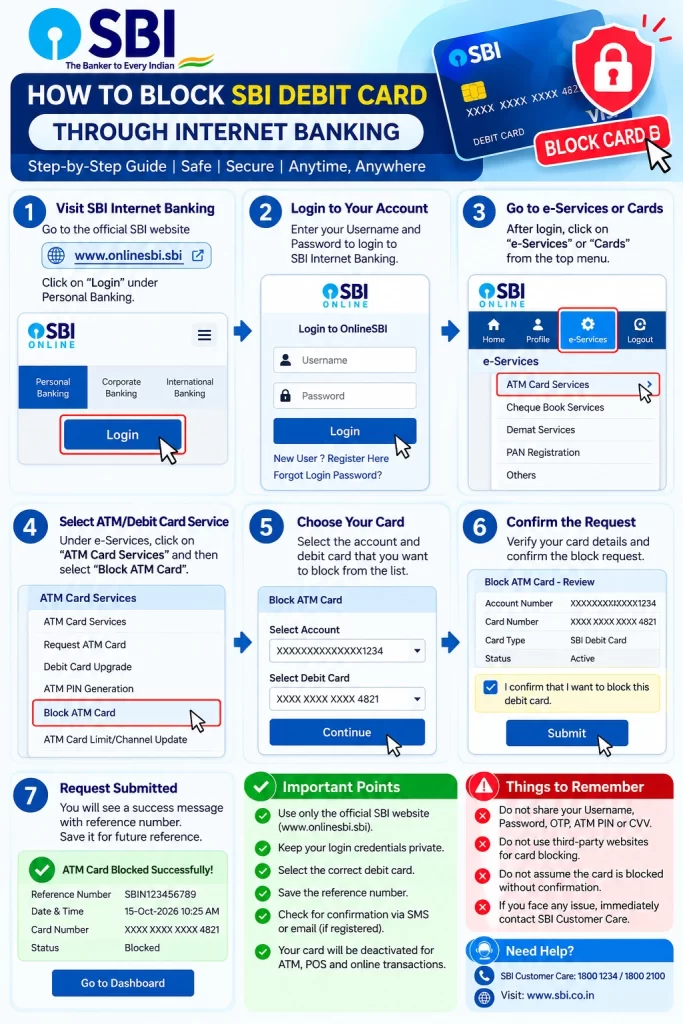
Official starting point: SBI Internet Banking.
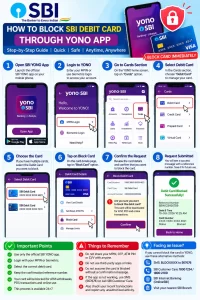
How to Block an SBI Debit Card Through the YONO App
SBI’s digital banking services include card-management facilities. Where card blocking is available in your version of YONO, you can use the app instead of visiting a branch.
- Open the official SBI YONO app already installed on your device.
- Sign in using your normal, secure authentication method.
- Look for the Cards, Debit Card or card-management section.
- Select the affected card and look for the block-card option.
- Review the card details and confirm the request using the instructions displayed by the app.
- Save the confirmation and check for a related bank notification.
Do not assume a particular menu path is universal. App layouts and service availability can change. If you cannot find the option, use SBI’s official website or telephone service. Do not delay an urgent block while troubleshooting the app.
Eligibility and Requirements for Blocking an SBI Debit Card
Card blocking is a protective service for SBI cardholders. The information needed depends on the channel you choose.
| Method | What you generally need |
|---|---|
| SMS | Registered mobile number and last four digits of the card |
| Telephone | Ability to call and provide the verification information requested by SBI |
| Internet banking | Access to your SBI internet banking account and required authentication |
| YONO | Access to the official app and the relevant card-management feature |
| Branch | Identity/account verification and any details or documents requested by the bank |
Do not send a photograph of your card, PIN or OTP to a person claiming to assist with blocking. SBI will follow its own authentication process.
What Should You Do After Blocking Your SBI Debit Card?
Blocking the card is the first step, not the end of the process. Take the following actions to protect your account and keep a record of what happened.
1. Keep proof of the blocking request
Save the confirmation SMS, ticket number, complaint number or online acknowledgement. Note the date and approximate time you reported the loss.
2. Review your account transactions
Check your recent transactions using a trusted SBI channel. Look for unfamiliar ATM withdrawals, card payments or online purchases. Report any suspicious transaction immediately.
3. Ask whether other banking channels need protection
If you suspect someone has accessed your internet banking, UPI or mobile banking credentials, tell SBI. Ask the bank to secure the affected services as well. Blocking a debit card alone does not necessarily disable internet banking or UPI.
4. Request a replacement card if necessary
If your card has been lost or stolen, ask SBI about obtaining a replacement through its official process. Check the current replacement fee, delivery method and expected timeline before submitting the request.
What If Money Has Already Been Deducted From Your SBI Account?
If you notice a transaction you did not authorize, report it to SBI immediately. Do not wait for the next bank statement or assume blocking the card automatically resolves the disputed payment.
- Block the affected debit card immediately.
- Contact SBI through its official customer-care channel and report the transaction.
- Record the complaint/reference number and retain relevant SMS alerts or transaction details.
- Ask SBI how to submit a formal unauthorized-transaction dispute and what supporting information is required.
- If the incident involves suspected online financial fraud in India, report it promptly through the national cybercrime helpline 1930 and/or the official National Cyber Crime Reporting Portal.
Do not assume a refund is guaranteed. The handling of unauthorized transactions depends on the facts, the type of transaction, the reporting timeline and applicable rules. Prompt reporting is important.
Common Problems When Blocking an SBI Debit Card
| Problem | What to do |
|---|---|
| SMS is not accepted | Check the format, last four digits and registered mobile number. Use another official method if it still fails. |
| No confirmation arrives | Do not assume the card is blocked. Contact SBI and verify the request status. |
| Registered SIM is unavailable | Call SBI through an official number or visit a branch for identity verification and assistance. |
| Internet banking login fails | Use telephone or branch assistance instead of delaying the block. |
| YONO does not show card controls | Check the current official instructions or use another SBI blocking channel. |
| An unfamiliar transaction appears | Block the card and report the transaction to SBI immediately. |
Security Tips: Mistakes to Avoid When Blocking Your SBI Card
- Do not delay: If the card is stolen or its details may be compromised, block it immediately.
- Do not use an unverified number: Confirm contact details on SBI’s official website.
- Do not share confidential information: Never disclose your PIN, OTP, CVV or password to a caller or message sender.
- Do not assume the card is blocked: Wait for confirmation or verify the status with SBI.
- Do not confuse card blocking with account blocking: Ask SBI about other services if you suspect broader account compromise.
- Do not ignore transaction alerts: Report unfamiliar activity even if the card has already been blocked.
- Double-check the card digits: Ensure that you are requesting a block for the correct card.
Printable SBI Debit Card Blocking Checklist
Use this independent educational checklist to remember the immediate steps if your card is lost, stolen or misused. It is not an official SBI form.
Visit FinBankingTech.com for banking guides. A downloadable checklist should only be linked here once the website has uploaded the PDF to its own verified media library.
Frequently Asked Questions About SBI Debit Card Blocking
1. How can I block my SBI debit card instantly?
You can use SBI’s SMS blocking procedure, official Contact Centre, internet banking or another supported official channel. If your card is lost or stolen, act immediately and verify that the block has been accepted.
2. What is the SBI card block SMS number?
SBI’s published SBI Quick instructions list 567676 for the debit-card blocking SMS procedure. Check the official SBI website for the latest instructions.
3. What is the SMS format to block an SBI ATM card?
The published format is BLOCKXXXX, where XXXX represents the last four digits of the card. Send it from your registered mobile number to 567676.
4. Can I block my SBI debit card without internet banking?
Yes. SBI publishes an SMS-based procedure and provides telephone assistance. You can also visit an SBI branch if required.
5. Can I block my SBI ATM card without visiting a branch?
Yes, if you can successfully use an available remote channel, such as SMS, customer care or online banking. A branch visit may be necessary if you cannot complete remote verification.
6. Can I block an SBI debit card through YONO?
Use the official YONO app and check its current card-management options. If card blocking is unavailable in your app, use SBI’s SMS, telephone or internet banking procedure instead.
7. What is SBI’s debit card blocking customer-care number?
SBI’s official Contact Centre currently lists 1800 1234 and 1800 2100. Verify the numbers on SBI’s Contact Centre page before calling.
8. Can I block my SBI card if my registered mobile number is not working?
Use an official telephone or branch channel and complete the bank’s identity-verification process. Do not assume the SMS method will work from an unregistered number.
9. How do I know whether my SBI debit card has been blocked?
Check the confirmation SMS or reference number. If you do not receive confirmation, contact SBI and verify the card’s status.
10. Can I unblock my SBI debit card after finding it?
Do not assume a blocked card can be reactivated. The outcome depends on the type of block and SBI’s current rules. Contact SBI to check whether reactivation is possible or a replacement card is needed.
11. Will blocking my SBI debit card close my bank account?
No. Blocking a debit card is different from closing the linked bank account. Your account generally remains open unless you separately request account closure or another restriction applies.
12. Does blocking my SBI ATM card also block UPI?
Do not assume so. Debit-card blocking and UPI blocking are separate services. If you suspect UPI misuse, contact SBI and ask for the appropriate protective action.
13. Does blocking my SBI debit card stop internet banking?
Not necessarily. If your internet banking credentials may have been exposed, ask SBI to secure internet banking separately.
14. What should I do if money is deducted after I lose my card?
Block the card immediately, report the unauthorized transaction to SBI, save the complaint number and follow the bank’s dispute procedure. For suspected cyber financial fraud, report promptly through the official Indian cybercrime channels as well.
15. Can I block an SBI debit card from another city?
Yes, you can use an available official remote channel from another city, subject to authentication and service availability. You do not necessarily need to visit your home branch.
16. Is there a charge for blocking an SBI debit card?
Check SBI’s current terms for the relevant card and service. Do not confuse blocking a card with the possible charges for issuing a replacement card.
17. How can I get a replacement SBI debit card?
After reporting the loss and blocking the old card, use SBI’s official card-replacement process through a supported digital channel or branch. Confirm current charges and delivery details with SBI.
18. What if the SBI card-block SMS fails?
Check the message format, card digits and registered mobile number. If it still fails, use the Contact Centre or an official online channel and verify the blocking status.
19. Should I report the loss if I have already blocked the card?
Yes, particularly if the card was stolen or you notice unauthorized transactions. Keep a record of the blocking request and any separate fraud complaint.
20. Where can I find the latest official SBI card-blocking instructions?
Visit SBI’s official Contact Centre and SBI Quick pages.
Conclusion
If your SBI ATM or debit card is lost, stolen or potentially compromised, do not wait until you can visit a bank branch. Start with an available official blocking method. SBI’s published SMS procedure uses BLOCKXXXX sent to 567676 from your registered mobile number, and its Contact Centre provides another route for customers who need assistance.
Always save your confirmation, review recent transactions and report unauthorized activity immediately. If you suspect that your internet banking or UPI credentials are also compromised, ask SBI to secure those services separately.
Official SBI Resources
Stay Connected With FinBankingTech
FinBankingTech.com publishes independent educational guides about banking, digital payments and personal finance. It is not affiliated with or an official support channel of State Bank of India.
Join Telegram
WhatsApp
Visit Website
Editorial note: This article is for general educational purposes. Banking procedures can change. Confirm current instructions with SBI before acting.