UPI payment failed but amount deducted? Don’t panic. Learn why UPI payments fail, refund timelines, NPCI rules, bank responsibilities, and step-by-step methods to get your money back fast. Real-life examples, FAQs, and practical solutions included.
UPI Payment Failed but Amount Deducted
Introduction:
In the era of instant digital payments, UPI (Unified Payments Interface) has become the backbone of India’s cashless economy. Millions of users transfer money daily through apps like Google Pay, PhonePe, Paytm, and BHIM. But what happens when your UPI payment fails and the amount gets deducted from your account? 😟
Don’t panic — this is a common issue caused by network delays or bank server timeouts. The good news? Your money is almost always safe and automatically refunded within a specific time frame.
This guide explains **why UPI payments fail**, **what to do if money is deducted**, **refund timelines**, and **how to raise complaints** through banks, NPCI, or RBI channels. Let’s fix your UPI issue step by step.
🔍 Quick Overview of UPI Payment Failed Issue
| Topic | Details |
|---|---|
| Common Issue | UPI Payment Failed but Amount Deducted |
| Root Causes | Bank server error, network issue, NPCI timeout |
| Refund Time | Usually within 3–5 working days |
| Responsible Entity | NPCI + Remitter’s Bank |
| Complaint Portal | NPCI Dispute Redressal / RBI Ombudsman |
| Support Channels | Bank helpline, UPI App support (Google Pay, Paytm, etc.) |
—
🔗 Important Official Links
| Platform | Official Link |
|---|---|
| NPCI Complaint Portal | https://www.npci.org.in |
| BHIM UPI App | https://www.bhimupi.org.in |
| RBI Ombudsman | https://cms.rbi.org.in |
| FinBankingTech (Our Site) | https://finbankingtech.com |
| Join Telegram for Updates | Join Telegram |
| Join WhatsApp Group | Join WhatsApp |
—
💡 Why UPI Payment Failed but Amount Deducted Happens
UPI transactions rely on three systems working together — your bank, the receiver’s bank, and NPCI. If any of these face technical issues, your transaction may fail even after debiting your account. Common reasons include:
- Temporary server downtime (sender or receiver bank)
- Slow internet connection or app crash
- NPCI switch timeout (high load on system)
- Payment made outside working hours
- Incorrect UPI ID or account number
—
⏱️ What Happens After UPI Transaction Fails
When a UPI transaction fails, your money is placed in a “on-hold state” between the two banks. Once the system detects the failure, it automatically reverses the amount to your original account.
Here’s a quick refund timeline:
| Type of UPI Issue | Expected Refund Time |
|---|---|
| Failed transaction with deduction | Within 1–3 working days |
| Transaction pending (timeout) | Up to 5 working days |
| Technical failure / Dispute raised | Up to 7 working days (as per NPCI) |
🧭 Step-by-Step: What to Do If UPI Payment Failed but Amount Deducted
- Step 1: Wait for 24 hours. Many failed transactions are automatically refunded.
- Step 2: Check your bank account and UPI app transaction history.
- Step 3: If not refunded, contact your bank’s UPI customer care (mention transaction ID).
- Step 4: Raise a complaint in the UPI app (Google Pay, Paytm, PhonePe).
- Step 5: If unresolved, escalate to NPCI or RBI Ombudsman.
⚠️ Common Mistakes Users Make
- Trying multiple UPI payments during bank downtime
- Entering wrong UPI ID or mobile number
- Not updating app or phone software
- Ignoring SMS alerts or email confirmations
- Not keeping transaction ID screenshots for reference
💰 Refund and Dispute Policy (NPCI Guidelines)
According to NPCI and RBI, banks must resolve failed UPI payment disputes within the below time frames:
- Auto Reversal: Within T+1 days (1 day after transaction)
- Customer Complaint: Within 5 working days
- RBI Ombudsman Escalation: 30 days (if bank fails to resolve)
📞 How to Raise a Complaint for Failed UPI Payment
| Platform | Complaint Link / Process |
|---|---|
| Google Pay | Help → Send Feedback → Chat Support |
| PhonePe | Help → Transaction History → Report Issue |
| Paytm | Help & Support → Payment Failed Section |
| BHIM App | Raise a Complaint on BHIM Portal |
✅ Safety Tips for Secure UPI Transactions
- Always verify receiver’s UPI ID or QR code
- Use UPI apps only from official app stores
- Never share your UPI PIN or OTP
- Enable app lock and phone lock
- Check bank downtime notifications before high-value transfers
📊 Quick Summary Table
| Action | Details |
|---|---|
| Refund Time | 1–5 working days |
| Complaint Authority | NPCI / Bank / RBI |
| Helpline | Bank’s customer care or UPI app support |
| Transaction Limit | Up to ₹1 Lakh per day (varies by bank) |
How to Open Indian Bank Account Online
📋 Eligibility Criteria for UPI Refund
- Transaction must be done via verified UPI app
- Transaction ID available in app or SMS
- Payment must have been debited but not received by beneficiary
- Bank account should be active and linked to the same UPI ID
How to Get Cashback on UPI Transactions in 2025 | UPI Cashback Offers Explained
💬 20 FAQs on “UPI Payment Failed but Amount Deducted”
- Q1. Why was money deducted even though my UPI payment failed?
A: Due to bank server delay or network timeout; money is auto-refunded. - Q2. How long does it take to get my refund?
- A: Usually within 1–5 working days.
- Q3. Can I get my money instantly?
- A: Sometimes yes, but if the transaction stuck in NPCI queue, it may take longer.
- Q4. What should I do if I don’t get refund in 5 days?
- A: Contact your bank or raise a complaint at NPCI.
- Q5. Is UPI safe?
- A: Yes, it’s secure if you use official apps and never share your UPI PIN.
- Q6. Who controls UPI system?
- A: NPCI (National Payments Corporation of India).
- Q7. Can I use UPI internationally?
- A: Yes, in countries like Singapore, UAE, France (2025 update).
- Q8. What is UPI transaction limit?
- A: Up to ₹1,00,000 per day (varies by bank).
- Q9. How to check if UPI is down?
- A: Use sites like UPI Status or bank notifications.
- Q10. Can I reverse a wrong UPI transfer?
- A: No, but you can request a refund from the receiver or raise a dispute.
- Q11. What if I enter wrong UPI ID?
- A: Money may go to wrong account; immediately contact your bank.
- Q12. How do I report fraud?
- A: Call bank fraud helpline or dial 1930 (cyber fraud helpline).
- Q13. Can I file complaint at RBI?
- A: Yes, through RBI CMS Portal.
- Q14. What happens if refund fails?
- A: Bank re-credits manually within 7 working days.
- Q15. Do weekends delay refunds?
- A: Yes, refunds are processed only on working days.
- Q16. Can I check refund status?
- A: Yes, in your UPI app or through your bank statement.
- Q17. Is there any refund charge?
- A: No, refund is completely free.
- Q18. Does NPCI track every UPI transaction?
- A: Yes, for verification and fraud prevention.
- Q19. What’s the helpline for UPI issues?
- A: Call your bank or NPCI support.
- Q20. How to avoid UPI failure next time?
- A: Use stable internet, check server status, and avoid multiple retries.
Difference Between Primary and Secondary Market
📢 Connect with Us
Note: All UPI refund policies follow NPCI and RBI guidelines. Refund timelines may vary based on bank response and technical issues.
Difference Between Primary and Secondary Market
✅ Conclusion
Facing a UPI Payment Failed but Amount Deducted issue can be stressful, but in most cases, your money is completely safe. Just keep your transaction ID, wait for 24 hours, and contact your bank if the amount doesn’t return automatically.
Digital payments in India have become faster and safer — and by understanding the process, you can handle such issues confidently. Stay updated with FinBankingTech.com for verified fintech guides and real solutions. 💸
✅ Real-Life Story (Use Anywhere in the Blog for Emotional Impact)
🟦 Real-Life Story: “Rohit’s UPI Payment Nightmare” (Highly Relatable)
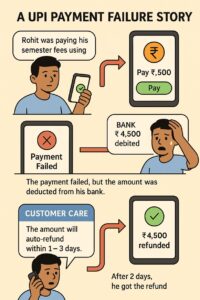
Rohit, a college student from Lucknow, was paying his semester exam fees through UPI using Google Pay. It was the last date to submit the payment, and he had waited in the queue for almost an hour due to heavy rush at the university’s accounts office. Since the staff encouraged online payment, Rohit quickly opened GPay and scanned the QR code.
The moment he clicked “Pay ₹4,500”, the internet suddenly dipped.
The screen froze for a few seconds and then flashed:
“Payment Failed. Please try again.”
But to Rohit’s shock, his bank sent an SMS:
“₹4,500 debited from your account.”
Panic hit him. It was the last day for fee submission, and he didn’t have extra money to try again. He felt helpless and embarrassed as people queued behind him.
The university staff told him,
“Beta, failed UPI ka refund 2–3 din lagenge. You try again with cash or card.”
Rohit didn’t have either.
Almost in tears, he called his bank’s customer care and submitted the transaction ID. The representative assured him,
“Sir, your payment is safe. The amount will auto-refund within 24–48 hours.”
To his relief, the next morning, while having breakfast, his phone buzzed:
“UPI Failure Refund: ₹4,500 credited to your account.”
He paid the fees successfully the same day.
Later Rohit learned that his issue happened because the receiver bank server was down, not because the app was faulty. Today, whenever a friend faces UPI payment issues, Rohit confidently explains the refund process and even saves their day.
🟥 Another Short Story (You Can Use Inside a Sidebar Box)
“Shruti bought a book on Amazon using UPI, but the payment failed. The seller didn’t receive the money, but her bank deducted ₹799. She raised a complaint through the Amazon app, but the app displayed: ‘Waiting for bank confirmation.’
Within 48 hours, the bank auto-refunded the amount. Shruti now checks UPI server status before making large payments.”