Learn the SBI UPI limit per day, per-transaction rules, YONO UPI restrictions, cooling periods, and what to do when your SBI UPI limit is reached.
How to Increase SBI UPI Limit Per Day
If you are trying to send a larger amount through SBI UPI and your payment is being declined, the first thing to check is your applicable transaction limit. The SBI UPI limit per day is generally up to ₹1,00,000 for standard UPI payments, according to SBI’s published customer guidance. However, the amount you can actually transfer may be lower because of a cooling period, transaction count restrictions, your UPI app, the payment category or a security restriction on your account.
Many customers search for an SBI YONO UPI limit increase option because they assume that a setting in the app can raise the maximum amount. In practice, there is no guarantee that a customer can manually increase the standard UPI ceiling. The applicable limit depends on SBI’s rules, NPCI guidelines and the payment type.
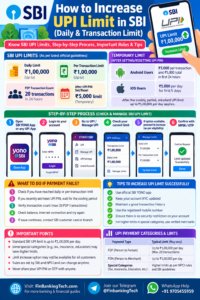
This guide explains SBI UPI daily and per-transaction limits, how to check the reason for a failed payment, what you can do if your limit has been reached, and when to contact SBI. It also covers the temporary restrictions that may apply after setting or resetting a UPI PIN.
SBI UPI Limit Per Day: Quick Overview
| Particular | Published guidance |
|---|---|
| Standard SBI UPI value limit | Up to ₹1,00,000 per day |
| Standard per-transaction limit | Generally up to ₹1,00,000, subject to applicable rules |
| Person-to-person (P2P) transactions | SBI publishes a maximum of 20 transactions in 24 hours within its stated value limit |
| After setting/resetting UPI PIN | A temporary ₹5,000 limit may apply, with different cooling periods for Android and iOS |
| Eligible special payment categories | Higher limits may apply to specified categories and verified merchants |
| Can every customer increase the limit manually? | No. Do not assume a general limit-increase switch is available |
Source note: These figures reflect SBI’s published UPI customer guidance available at the time of research. Limits can change, and a specific account or app may apply additional restrictions. Check the latest SBI UPI customer-care information before relying on a limit.
Important Official Links
| Purpose | Link |
|---|---|
| SBI UPI customer guidance | SBI UPI FAQs |
| SBI UPI limits and cooling periods | SBI YONO guidance |
| SBI Internet Banking | Official SBI Internet Banking page |
| NPCI UPI FAQs | NPCI official UPI FAQs |
| FinBankingTech | Banking and financial guides |
What Is the SBI UPI Limit?
The UPI limit is the maximum amount you can send or pay through the Unified Payments Interface within a specified period or in a single transaction. SBI customers can use UPI through supported SBI applications and other compatible UPI apps linked to an eligible SBI account.
Three different restrictions are often confused:
- Per-transaction limit: The maximum value permitted for one payment.
- Daily or 24-hour limit: The cumulative value permitted during the applicable period.
- Transaction-count limit: The maximum number of transactions permitted within the relevant period.
A payment can fail even when its value is below ₹1 lakh. For example, you may have already used most of your permitted daily amount, reached a transaction-count restriction or be subject to a temporary security limit.
SBI UPI Daily Limit and Per-Transaction Limit Explained
1. Standard UPI payments
SBI’s published UPI guidance states a standard value limit of up to ₹1,00,000 per day. SBI’s UPI FAQ also describes a maximum of 20 person-to-person (P2P) transactions in 24 hours within the stated ₹1,00,000 value limit. These are ceilings, not a promise that every payment will be approved.
2. Person-to-person payments
P2P payments are transfers between individuals, such as sending money to a family member or friend. SBI’s published guidance specifies a maximum of 20 P2P transactions in 24 hours within its stated limit. A payment may also be restricted by the receiving bank, the app or a security check.
3. Person-to-merchant payments
P2M payments are payments to merchants, such as a shop, service provider or eligible online business. SBI’s guidance distinguishes P2M from P2P transactions. The transaction count and permitted value can depend on the payment category and applicable bank rules.
4. Higher limits for selected categories
NPCI permits higher per-transaction limits for certain specified categories, including eligible verified merchants. Examples can include selected capital-market, insurance, tax, hospital, educational-institution and IPO-related payments. The permitted ceiling varies by category, and banks may apply internal limits within NPCI’s rules.
LIC Life Insurance: Plans, Benefits, Premium & Complete Guide 2026
A higher limit for an eligible merchant category does not mean that an ordinary transfer to a friend can also be made for the same amount. Check the current NPCI rules and your bank’s restrictions for the exact payment type.
Can You Increase the SBI UPI Limit in YONO?
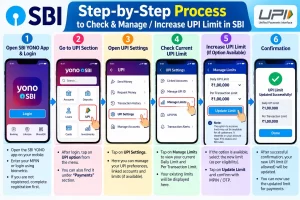
If you are looking for an SBI YONO UPI limit increase, start by identifying which restriction is affecting the payment. SBI’s published standard limit is a maximum, and the official guidance does not establish a universal setting that lets every customer raise it for ordinary UPI transfers.
Use the following process to investigate the issue safely.
- Open your official SBI or UPI app. Make sure it is the genuine app installed from a trusted app store.
- Review the failed payment. Read the displayed error and check the payment history, if available.
- Check whether you recently set or reset your UPI PIN. A temporary cooling-period restriction may apply.
- Check your cumulative usage. Add the successful payments made during the applicable period and consider the transaction-count limit.
- Review the payment category. A merchant payment and an ordinary transfer may be subject to different rules.
- Contact SBI if the restriction remains unclear. Use official SBI support or your branch to ask which limit applies to your account and whether any permitted action is available.
Do not follow instructions from unofficial websites or callers claiming they can unlock a higher UPI limit in exchange for your OTP, UPI PIN or screen-sharing access.
UPI Cooling Period After Setting or Resetting Your PIN
One reason customers cannot send a large amount immediately is a temporary restriction after creating or resetting their UPI PIN. SBI’s published guidance describes the following cooling-period rules for its supported UPI services:
| Device | Published temporary restriction |
|---|---|
| Android | Maximum ₹5,000 for the first transaction and ₹5,000 cumulative during the first 24 hours |
| iOS | ₹5,000 per day for the first five days |
After the applicable cooling period, SBI’s guidance states that the standard limit is currently up to ₹1,00,000 per transaction and per day for the specified SBI UPI services. These restrictions are subject to change, so check SBI’s current UPI limit and cooling-period guidance.
Practical advice: If you have just reset your UPI PIN and need to make a large payment, do not repeatedly retry the transaction. Check the applicable cooling period and plan your payment accordingly.
What to Do When Your SBI UPI Limit Is Reached
The correct next step depends on why the payment was declined. Use this troubleshooting table before attempting another payment.
| Problem | What to do |
|---|---|
| Daily amount limit reached | Check the applicable period and wait for the limit to reset. For urgent payments, ask the beneficiary which other bank-supported payment methods they accept. |
| Transaction-count limit reached | Review the applicable P2P restriction and wait until eligible transactions can be made again. |
| Recently reset UPI PIN | Check the applicable cooling period before retrying a larger payment. |
| Bank server or technical error | Check transaction status and avoid sending the same payment again until you know whether the first attempt succeeded. |
| Account debited but recipient not credited | Check the transaction history and raise a dispute through the app or official bank channel if needed. |
| Unknown restriction or suspected account block | Contact SBI through its official website, app or branch. |
Can You Use NEFT or IMPS Instead of UPI?
Yes, you may be able to use another bank-supported transfer method when UPI does not meet your payment requirement. NEFT and IMPS have their own availability, limits, processing conditions and applicable charges. The permitted amount depends on the selected channel, account restrictions, beneficiary details and SBI’s current rules.
Before sending a large amount, compare the permitted limits and charges on the official SBI website or in your authenticated banking service. Do not assume that a transfer method has unlimited capacity or that a payment will be processed instantly in every circumstance.
For account access help, read our guides to activating SBI Net Banking without visiting a branch and activating SBI Net Banking online.
Common Mistakes to Avoid
- Assuming ₹1 lakh is available for every payment: It is a published ceiling, not a guaranteed transaction approval.
- Confusing daily and per-transaction limits: A payment may fit within one limit but exceed another.
- Ignoring the cooling period: A new or reset UPI PIN may trigger temporary restrictions.
- Repeatedly retrying failed payments: Check the status of the original attempt first to avoid duplicate payments.
- Using unofficial support: Never share your UPI PIN, OTP or banking password with someone promising to increase your limit.
- Assuming every app has identical restrictions: The app, bank, payment category and applicable rules may affect the result.
UPI Limit Safety Checklist
- Confirm the recipient’s name and UPI ID before authorising payment.
- Check the current transaction limit in the official app or bank guidance.
- Keep enough available account balance for the payment.
- Review the payment status before attempting a second transfer.
- Never disclose your UPI PIN or OTP.
- Use only official SBI support channels for account-specific restrictions.
Frequently Asked Questions About SBI UPI Limits
1. What is the SBI UPI limit per day?
SBI’s published guidance states a standard UPI value limit of up to ₹1,00,000 per day. The actual permitted amount may be lower because of transaction-specific or security restrictions.
2. Can I increase my SBI UPI limit online?
There is no guarantee that a general manual increase option is available. Check the restriction in your app and ask SBI whether any permitted change applies to your account and payment type.
3. How can I increase the SBI YONO UPI limit?
First identify the reason for the restriction. Review your payment history, check for a recent UPI PIN reset and consult SBI’s current limit guidance. Do not assume YONO has a setting that overrides the standard UPI ceiling.
4. What is the SBI UPI limit per transaction?
SBI’s published guidance states a standard limit of up to ₹1,00,000 per transaction for its specified UPI services, subject to applicable rules and restrictions.
5. How many UPI transactions can I make from SBI in a day?
SBI’s published guidance specifies a maximum of 20 person-to-person transactions in 24 hours within the stated ₹1,00,000 value limit. Other transaction types may follow different conditions.
6. Why is my SBI UPI limit only ₹5,000?
A temporary cooling-period restriction may apply after setting or resetting your UPI PIN. Check SBI’s current rules for your device and registration circumstances.
7. How long does the SBI UPI cooling period last?
SBI’s published guidance describes a first-24-hour restriction for Android and a ₹5,000-per-day restriction for the first five days on iOS. Verify the current rules before making a high-value payment.
8. Can I send ₹1 lakh through SBI UPI in one transaction?
The standard published ceiling is up to ₹1 lakh, but a particular payment may be blocked by your available balance, remaining daily limit, app restrictions or security controls.
9. Does SBI UPI have a separate daily and per-transaction limit?
Yes. A per-transaction limit applies to one payment, while a daily limit restricts the total value across multiple payments during the applicable period.
10. Does the UPI limit apply to PhonePe and Google Pay linked to SBI?
Payments made through another UPI app can still be subject to SBI’s account-level rules, NPCI requirements and the app’s own restrictions. Check the rules applicable to your specific payment.
11. Can I increase the UPI limit by changing my UPI PIN?
No. Changing a PIN is not a method for raising the standard UPI limit. Setting or resetting a PIN may instead trigger a temporary cooling period.
12. Why is my SBI UPI transaction failing below ₹1 lakh?
Possible reasons include an exhausted daily limit, a transaction-count restriction, a cooling period, insufficient funds, technical issues or a security restriction.
13. Are SBI UPI limits the same for Android and iPhone?
SBI’s published cooling-period guidance differs between Android and iOS. Other restrictions may also depend on the app and transaction type.
14. Can I make a UPI payment above ₹1 lakh?
Some specified payment categories have higher permitted limits under NPCI rules, subject to eligibility, verified-merchant conditions and bank restrictions. These higher ceilings do not automatically apply to ordinary person-to-person transfers.
15. Can I increase my UPI limit by visiting an SBI branch?
You can ask the branch to clarify an account-specific restriction. However, a branch visit does not guarantee that the standard UPI ceiling can be raised.
16. What should I do if SBI debits my account but the UPI payment fails?
Check the transaction status and allow the applicable reversal process to work. If the amount is not returned, raise a dispute through the app or contact SBI using an official channel.
17. Can I use NEFT if my SBI UPI limit is exhausted?
NEFT may be an alternative if it suits your payment. Check its applicable limits, charges, processing conditions and beneficiary requirements before proceeding.
18. Is there a charge for increasing the SBI UPI limit?
Do not pay an unofficial agent to increase a UPI limit. Check SBI’s official terms for any applicable banking service or transfer charges.
19. Does the SBI UPI limit reset at midnight?
Do not assume that every limit resets at midnight. SBI describes some restrictions in terms of a 24-hour period, so check the rule applicable to the transaction.
20. Where can I check the latest SBI UPI limit?
Visit the official SBI UPI FAQ and SBI’s YONO UPI limit guidance. You can also check NPCI’s official UPI FAQs for category-specific rules.
Conclusion: What Should You Do Next?
If your SBI UPI payment is being declined, do not assume that you must increase a setting. First check the daily value limit, transaction count, recent UPI PIN changes and the payment category. SBI’s standard published limit is up to ₹1,00,000 per day, but account-specific and temporary restrictions can reduce the amount available to you.
If the reason remains unclear, use SBI’s official support channels. For payments that cannot be completed through UPI, consider another suitable bank-supported transfer method after checking its limits and charges.
For more practical banking guides, visit FinBankingTech.com. You can also follow our Telegram channel or connect through WhatsApp. FinBankingTech is an independent educational website and is not affiliated with or an official support channel of SBI.
Official References
- State Bank of India — UPI Customer Care FAQs
- SBI YONO — UPI Limits and Cooling Periods
- National Payments Corporation of India — UPI FAQs
- NPCI — UPI Circulars
Editorial note: Limits and banking procedures can change. Verify current rules with SBI and NPCI before publication and whenever this article is updated. This article is for general educational purposes and is not a guarantee of transaction approval.