Learn how to create a UPI ID in the SBI app, link your bank account, set your UPI PIN and check whether UPI registration without a debit card is possible.
Create UPI ID in SBI App
Want to make UPI payments directly from your State Bank of India (SBI) account? You can register for UPI using a supported payment application, link your SBI bank account, and create a UPI ID that other people can use to send you money. Once the setup is complete, you can make eligible payments without entering your bank account number and IFSC every time.
In this guide, you will learn how to create a UPI ID in the SBI app, register through YONO SBI, link your account, set a UPI PIN, and troubleshoot common registration problems. We will also explain SBI UPI registration without a debit card, including the alternative authentication methods that may be available to eligible users.
The instructions focus on SBI’s official services. Menu names and available verification methods can change as the bank updates its applications, so always follow the instructions displayed in your official app.
Quick answer:
Open the official YONO SBI app, register or sign in as appropriate, go to YONO Pay → UPI, verify the mobile SIM registered with your SBI account, select your account and follow the on-screen instructions to create your UPI ID. You may also need to set a UPI PIN before sending money. If you do not have a debit card, check whether Aadhaar-based verification or another supported authentication method is available to you.
SBI UPI Registration: Quick Overview
| Detail | Information |
|---|---|
| Bank | State Bank of India |
| Main app route | YONO SBI → YONO Pay → UPI |
| What you need | An eligible bank account, a compatible smartphone, the registered mobile SIM and the verification method requested by the app |
| UPI ID | A virtual payment address used to send or receive money |
| UPI PIN | A security credential used to authorise eligible UPI payments |
| Debit card required? | Not necessarily for every supported PIN-setup method; eligibility and available options vary |
| Registration charges | Check current SBI terms; do not confuse registration with any applicable payment or merchant charges |
| Official guidance | SBI UPI FAQs |
Important Links for SBI UPI
| Purpose | Official or relevant link |
|---|---|
| SBI UPI instructions | Read SBI UPI FAQs |
| YONO SBI | Open the official YONO SBI portal |
| SBI digital banking | Visit SBI Digital Banking |
| UPI rules and FAQs | Read NPCI UPI FAQs |
| FinBankingTech | More banking guides |
What Is a UPI ID?
UPI stands for Unified Payments Interface. It is a digital payment system that allows people to transfer money between participating bank accounts through supported applications.
A UPI ID, also called a Virtual Payment Address (VPA), is an address used to identify a UPI account for payments. It can look something like example@sbi or use another handle offered by the payment application. These are examples only; an actual ID depends on the application’s available handles and whether the chosen address is available.
Instead of sharing your account number and IFSC for every payment, you can share your UPI ID when the recipient’s app supports that payment method. You can also scan a valid UPI QR code or pay using other supported options.
UPI ID vs UPI PIN: What Is the Difference?
| UPI ID | UPI PIN |
|---|---|
| Identifies your UPI payment address | Authorises eligible payments |
| Can be shared to receive money | Must never be shared with anyone |
| Created or selected during UPI registration, depending on the app | Set separately when required by the app |
Important: You do not need to enter your UPI PIN to receive money. If someone asks for your PIN to release a refund or credit money to your account, stop and verify the request.
Requirements to Create a UPI ID in SBI
Before starting, prepare the following:
- An active and eligible SBI savings or other supported bank account.
- A smartphone that can run the official payment application.
- The mobile number registered with your bank account, with the corresponding SIM available in the phone.
- Permission for the app to send or verify an SMS, if requested.
- A working mobile connection and sufficient network coverage.
- The authentication details required by your selected registration or PIN-setup method.
If you use Aadhaar-based verification, your Aadhaar-linked mobile number and bank-account eligibility must satisfy the requirements of the selected service. Do not assume that every app, account or device supports every verification method.
How to Create UPI ID in SBI App: Step-by-Step Guide
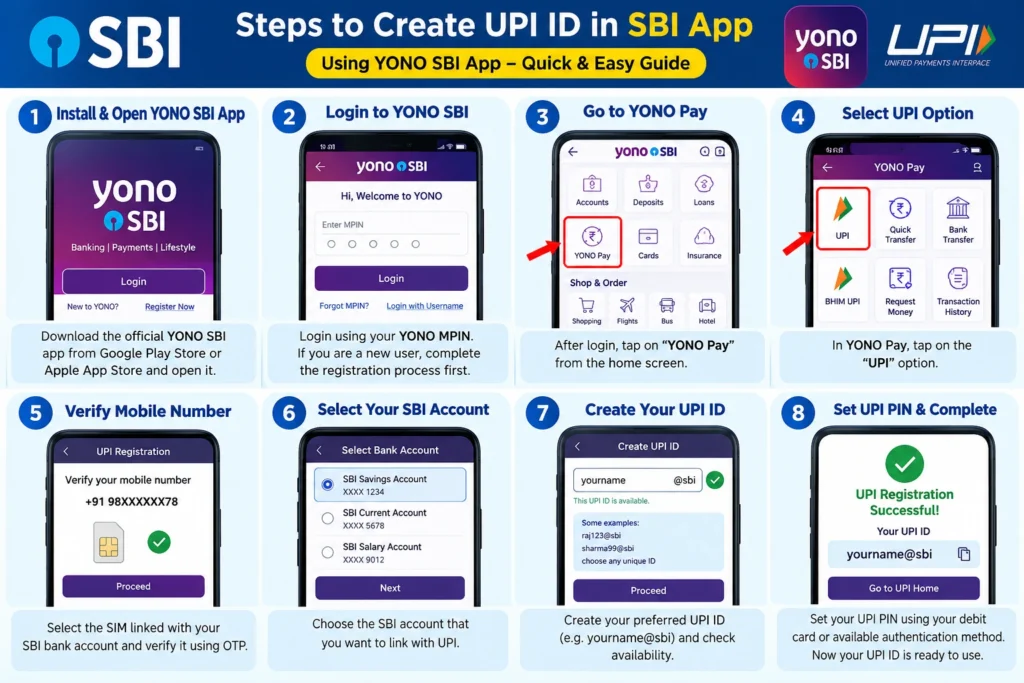
Step 1: Open the Official YONO SBI App
Install or open the official YONO SBI app from a trusted app store. Verify the publisher before installing it. Avoid APK files, advertisements claiming to provide special banking access, and links received from unknown people.
If you are an existing SBI customer, register or sign in using the method offered for existing customers. If you have not completed YONO registration, follow the bank’s current registration instructions first.
Step 2: Open the UPI Section
According to SBI’s published UPI guidance, SBI customers can access UPI through the following route:
App layouts can change. If you cannot find the exact menu, look for the UPI or payments section and check SBI’s official instructions rather than following an unrelated third-party tutorial.
Step 3: Verify Your Registered Mobile SIM
The app may ask you to select the SIM linked to your SBI account and verify the mobile number. Select the correct SIM and complete the on-screen verification.
Keep the registered SIM active, ensure SMS services work, and allow the app to perform the requested verification. If you use a dual-SIM phone, confirm that the correct SIM is selected for the verification process.
Step 4: Select Your SBI Bank Account
After verification, follow the app’s instructions to locate and link your eligible SBI account. Confirm the displayed bank and account details before continuing.
If your account is not displayed, do not try to link an unrelated account. Check whether your mobile number is correctly registered with SBI, whether the account is eligible for UPI, and whether the bank’s service is temporarily unavailable.
Step 5: Create or Choose Your UPI ID
Depending on the app’s current flow, you may be asked to create a preferred UPI ID or select one from suggested addresses. Enter your preferred ID if the option is available. If it is already taken or unsupported, choose another permitted address.
Check the displayed UPI ID carefully before confirming. Save it securely or use the app’s share function when you need to give it to someone who will pay you.
Step 6: Set Your UPI PIN if Required
Creating a UPI ID and setting a UPI PIN are different tasks. If the app asks you to set a PIN, select the offered verification method and follow its instructions.
Depending on eligibility and service support, PIN setup may use debit-card verification or an alternative method such as Aadhaar OTP. Do not assume that an alternative will appear for every SBI account or UPI app.
Create a PIN that is difficult for others to guess. Never tell it to a caller, share it over WhatsApp, or enter it on a website reached through an unsolicited message.
Step 7: Check Your UPI Registration
Once setup is complete, check that your UPI ID and linked SBI account appear correctly in the app. If you want to confirm that payments work, make a small payment to a trusted recipient after verifying the recipient’s details.
Do not make a test transfer to an unknown person or a UPI ID sent by an unverified caller.
Can You Register for SBI UPI Without a Debit Card?
Possibly, yes—but it depends on the authentication method supported for your account and the UPI app you use. A debit card is commonly used for initial UPI PIN setup, but NPCI’s published guidance also recognises Aadhaar OTP-based PIN setup where supported. Additional authentication methods may be introduced over time.
There are two separate questions to consider:
- Can you register and create a UPI ID? This involves verifying your mobile number and linking an eligible bank account.
- Can you set a UPI PIN without a debit card? This depends on whether an eligible alternative authentication method is offered by your bank and app.
Option 1: Check for Aadhaar-Based Verification
If your UPI app offers an Aadhaar OTP option, read its eligibility requirements. You may need an Aadhaar-linked mobile number and a bank account that meets the service’s conditions. Follow the official app’s instructions and never share an OTP with another person.
Option 2: Check Other Supported Authentication Methods
Authentication options can change. Check the PIN setup screen in the official application and the latest SBI or NPCI guidance. Use an alternative only if it is explicitly offered by the genuine app and you meet its requirements.
Option 3: Contact SBI if No Alternative Appears
If the app requires debit-card details and offers no suitable alternative, contact SBI through its official support channels or visit a branch. Ask about your account’s eligibility and the available way to establish UPI access.
Can You Create an SBI UPI ID Without Net Banking?
UPI registration and internet banking registration are not the same thing. A UPI app may let an eligible customer register and link a bank account without first activating SBI internet banking, depending on the app’s registration flow and authentication requirements.
However, YONO’s own registration process can have separate requirements for accessing its full banking features. If you are asked to register for internet banking or verify your identity, follow the current official instructions.
For more help, read our guides:
How to Use Your SBI UPI ID
After successful registration, you can use the available UPI features in your app to send or receive money.
To Receive Money
- Open the UPI section in your payment app.
- Find your UPI ID or use the app’s share option.
- Share the ID with the person who needs to pay you.
- Check your bank balance or transaction history to confirm the credit.
You do not need to enter your UPI PIN to receive a normal incoming payment.
To Send Money
- Open the UPI payment section.
- Choose the recipient’s UPI ID, QR code or another supported payment method.
- Verify the recipient’s name and enter the amount.
- Check all payment details before authorising the transaction.
- Enter your UPI PIN only in the genuine payment app when requested.
- Check the transaction status after payment.
Once you authorise a UPI payment, it may not be possible to stop it. Check the recipient and amount carefully before confirming.
Common SBI UPI Registration Problems and Solutions
| Problem | What to try |
|---|---|
| Mobile verification fails | Check the registered SIM, SMS service, network coverage and app permissions. |
| SBI account is not displayed | Confirm that the mobile number is registered correctly and that the account is eligible for UPI. |
| Preferred UPI ID is unavailable | Try a different permitted address or select one of the suggestions. |
| Debit-card details are requested | Check whether an official alternative PIN setup method is available for your account. |
| UPI PIN setup fails | Verify that you selected the correct bank account and follow the error message. Avoid repeated guesses. |
| App shows a temporary error | Check your connection, update the official app and retry later if bank services are temporarily unavailable. |
| Money is debited but the recipient is not credited | Check the transaction status and raise a complaint through the app or SBI’s official support if the issue remains unresolved. |
SBI UPI Safety Tips
- Install payment apps only from trusted app stores and verify the publisher.
- Never share your UPI PIN, OTP, debit-card PIN or internet banking password.
- Entering your UPI PIN normally authorises a payment; do not enter it simply to receive money.
- Verify the recipient’s name and amount before authorising a transfer.
- Do not scan a QR code or approve a collect request unless you understand and trust the transaction.
- Ignore callers who ask you to install remote-access applications to fix a banking problem.
- Report suspicious transactions promptly through your bank’s official channels.
LIC Life Insurance: Plans, Benefits, Premium & Complete Guide 2026
Illustrative Example: A Student Sets Up UPI
The following is a fictional example for explanation, not a customer testimonial.
Suppose Aman has an SBI savings account and wants to pay for books and receive money from his family. He installs the official YONO SBI app, verifies the mobile SIM registered with his account and follows the UPI registration steps. He links his eligible account and creates an available UPI ID. The app then guides him through the required PIN setup.
Before making his first payment, Aman checks the recipient’s name and amount. Later, when his family sends him money, he checks his account balance rather than sharing his PIN with anyone. This illustrates the basic workflow: register, link the account, set up authentication when required and verify transactions carefully.
Frequently Asked Questions About SBI UPI ID
1. How do I create a UPI ID in the SBI app?
Open the official YONO SBI app, access YONO Pay → UPI, verify the registered mobile SIM, link your eligible SBI account and follow the instructions to create or select a UPI ID.
2. Can I create a UPI ID in SBI without a debit card?
It may be possible if your app and account support an alternative UPI PIN setup method, such as Aadhaar OTP. Availability is not guaranteed for every customer.
3. Can I register for SBI UPI without internet banking?
UPI registration may be available without internet banking, depending on the app and account. YONO registration for other banking features can have separate requirements.
4. Is a UPI ID the same as a UPI PIN?
No. A UPI ID identifies your payment address. A UPI PIN is a security credential used to authorise eligible payments.
5. Is the UPI ID created automatically?
The app may offer suggested IDs or let you choose an available address. The exact process depends on the application.
6. Can I choose my own SBI UPI ID?
You may be able to select a preferred ID if the app supports custom IDs and the address is available. Follow the options displayed in the app.
7. What does a UPI ID look like?
It usually contains an identifier followed by a UPI handle, such as example@sbi. The actual handle depends on the app and its supported options.
8. Can I use my SBI account with another UPI app?
You can generally link an eligible SBI account to another supported UPI application by completing that app’s registration and verification process.
9. Can I have multiple UPI IDs?
Depending on the apps and services you use, you may be able to maintain multiple UPI IDs. Check each app’s available features.
10. Can I link more than one bank account to UPI?
Many UPI apps support linking multiple eligible bank accounts. The available features depend on the application and participating banks.
11. Do I need a smartphone to register for UPI through YONO?
YONO mobile registration requires a compatible smartphone. Other UPI services may have their own device requirements.
12. Why is my SBI account not showing in the UPI app?
Possible causes include a mobile-number mismatch, account eligibility restrictions, connectivity issues or a temporary bank-service problem. Check your details and retry.
13. Can I receive money without setting a UPI PIN?
Receiving a normal incoming UPI payment does not require you to enter your UPI PIN. Sending money normally requires the appropriate authorisation.
14. What should I do if I forget my UPI PIN?
Use the official app’s PIN reset option and follow the available verification method. Do not share your existing or new PIN with anyone.
15. Is my SBI UPI ID the same as my bank account number?
No. A UPI ID is a virtual payment address linked to an eligible bank account. It is not the account number itself.
16. Does SBI charge for creating a UPI ID?
Check current SBI and application terms for any applicable charges. Registration and the charges associated with specific payment services are separate questions.
17. What happens if I change my mobile phone?
You may need to reinstall or register the app on the new device and verify your registered mobile number again. Follow the app’s official migration process.
18. Can I use the same UPI ID in every payment app?
Do not assume this. A UPI ID may be tied to a particular app or provider handle. Follow the registration process in the app you intend to use.
19. What if my UPI payment fails but my account is debited?
Check the transaction status and wait for the bank or payment app to process the reversal. If the amount is not returned within the applicable timeframe, raise a complaint using official support channels.
20. Where can I find official help for SBI UPI?
Use the SBI UPI FAQ page or the official SBI website. Do not rely on unverified customer-care numbers found in comments or social-media posts.
Conclusion
Creating a UPI ID in the SBI app is a straightforward process when your bank account, registered mobile SIM and authentication method are ready. Start with the official YONO SBI app, open the UPI section, link your eligible account and follow the registration instructions.
If you do not have a debit card, check whether the official app offers an eligible alternative for UPI PIN setup. Do not assume that every account supports the same method, and never use another person’s banking credentials.
For the most accurate instructions, consult SBI’s official UPI guidance and NPCI’s UPI FAQs.
About FinBankingTech.comFinBankingTech.com publishes independent educational content about banking, digital payments and personal finance. It is not affiliated with or an official customer-support channel of State Bank of India.
Visit FinBankingTech.com |
Join our Telegram channel |
Contact us on WhatsApp
Editorial note: Banking-app screens, supported authentication methods and service terms may change. This educational guide was prepared using official SBI and NPCI resources available for review on 21 October 2026. Verify current instructions before publication.